关于 LLaMA-Factory
LLaMA-Factory(https://github.com/hiyouga/LLaMA-Factory)是一个统一的高效微调框架,支持对100多种大型语言模型(LLMs)进行灵活定制和高效训练。通过内置的 LLaMA Board 网页界面,用户无需编写代码即可完成模型微调。
前置准备
训练顺利运行需要包含4个必备条件
- 机器本身的硬件和驱动支持(包含显卡驱动,网络环境等) 硬件环境校验:
nvidia-smi预期输出如图,显示GPU当前状态和配置信息 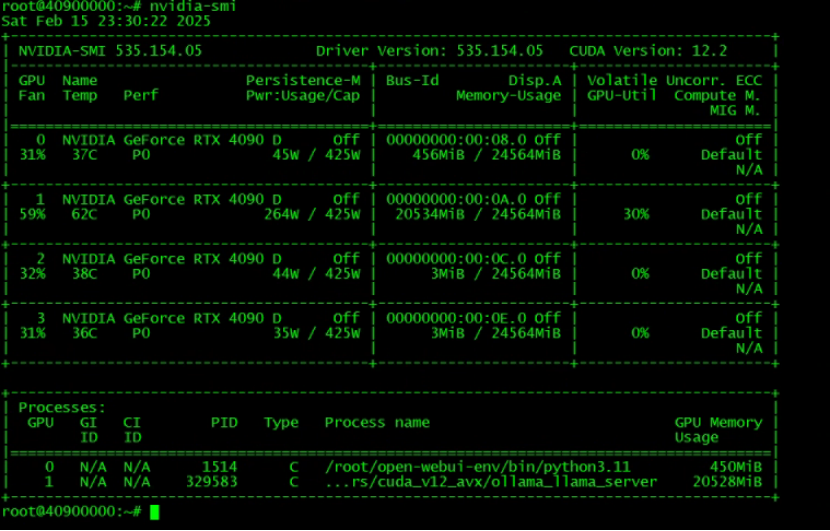
- 本项目及相关依赖的python库的正确安装(包含CUDA, Pytorch等) 下载项目
git clone https://github.com/hiyouga/LLaMA-Factory.git下载conda(python 版本管理工具)
wget -c https://repo.anaconda.com/archive/Anaconda3-2023.03-1-Linux-x86_64.sh安装 conda 在conda文件的目录下输入命令安装,一路回车,直到他要求输入yes
bash Anaconda3-2023.03-1-Linux-x86_64.sh设置环境变量
- 按下i键或者a键进入编辑模式, 'ESC退出'
- 当完成对文本的修改后,':wq '保存并退出
vim /etc/profile
export PATH=~/root/anaconda3/bin:$PATH

vim ~/.bashrc
export PATH=/anaconda3/bin:$PATH
刷新环境变量
source /etc/profile
source ~/.bashrc
conda -V要是正常就安装成功了
创建 llama_factory python环境
conda create -n llama_factory python=3.10环境初始化
conda init bash切换python环境
conda activate llama_factory安装依赖
pip install -e ".[torch,metrics]"国内需要配置镜像源
vim ~/.condarc

channels:
  - https://mirrors.tuna.tsinghua.edu.cn/anaconda/pkgs/free/
  - https://mirrors.tuna.tsinghua.edu.cn/anaconda/pkgs/main/
  - https://mirrors.tuna.tsinghua.edu.cn/anaconda/cloud/pytorch/
  - https://mirrors.tuna.tsinghua.edu.cn/anaconda/cloud/msys2/
show_channel_urls: true

ssl_verify: true
allow_conda_downgrades: true
pip配置
mkdir ~/.pip
cd ~/.pip/
vim pip.conf

[global]
index-url = http://mirrors.aliyun.com/pypi/simple/
[install]
trusted-host=mirrors.aliyun.com
启动项目
CUDA_VISIBLE_DEVICES=0 GRADIO_SHARE=1 GRADIO_SERVER_PORT=7860 llamafactory-cli webui